This example shows how to send variuos type of messages (SMS, CALL, EMAIL, TELEGRAM).
SMM Server must be enabled to send Emails and Telegram messages.
Telegram messages are sent only to registered users of MyAviorBot
RULE 1
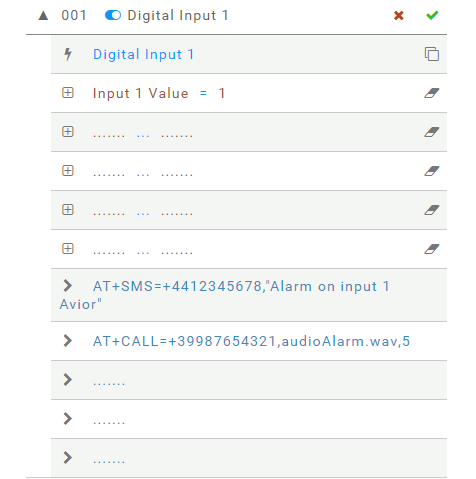
Every time digital input 1 is closed an SMS with text "Alarm on input 1 Avior" will be sent at phone number +4412345678 and a phone CALL issued to +39987654321 playing audio file "audioAlarm.wav" 1 which is repeated 5 times.
- Any change (opening/closing) on input 1 triggers the rule
- Verify the input is close
- The first action is to send an SMS to destination
- The second action is make a call and play an audio message on answer
RULE 2
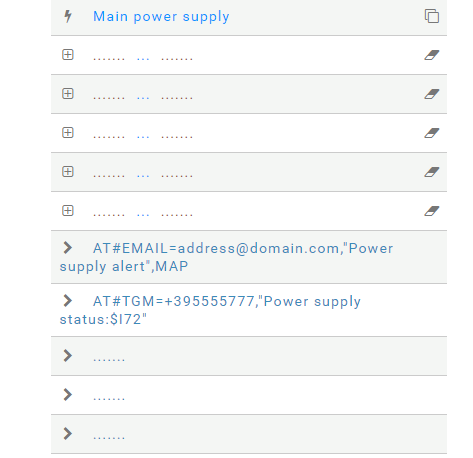
Every time the main power supply is lost or restored an EMAIL with subject "Power supply alert" and a Telegram chat message issued to +395555777 with message "Power supply status:0" or "Power supply status:1" depending on the state of MAIN power supply.
- Any change on main power supply triggers the rule
- We do not set any conditions
- The first action is to send an EMAIL to address@domain.com
- The second action is to send a Telegram message
including the TAG$I72which is the status of main power supply
AT COMMANDS
The rules described above can also be set with the following AT commands
AT#ER=XXX_I1_$I12=1_____AT+SMS=+4412345678,"Alarm on input 1 Avior"_AT+CALL=+39987654321,audioAlarm.wav,5___
AT#ER=XXX_I7______AT#EMAIL=address@domain.com,"Power supply alert",MAP_AT#TGM=+395555777,"Power supply status:$I72"___
-
audio files must be created and stored before to use it ↩︎