This example explain how to define and manage commands within an SMS.
RULE 1
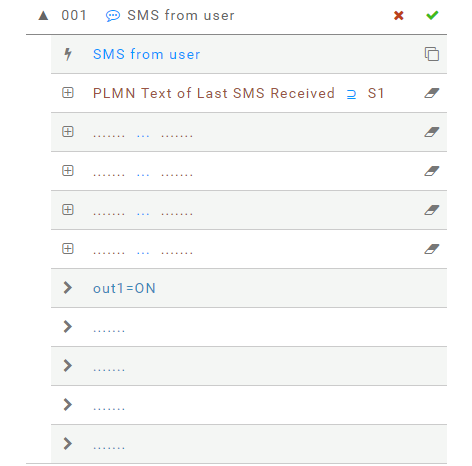
Switch on output 1 when an enabled user send an SMS including the text "S1"
- An incoming SMS from an enabled user triggers the rule
- Verify the last SMS includes the text
S1
It means Last SMS received is a SUPERSET of S1 - The first action is to switch on output 1
RULE 2
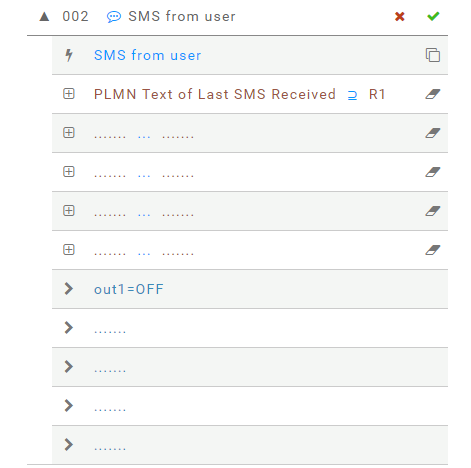
Switch off output 1 when an enabled user send an SMS including the text "R1"
- An incoming SMS from an enabled user triggers the rule
- Verify the last SMS includes the text
R1
It means Last SMS received is a SUPERSET of R1 - The first action is to switch off output 1
RULE 3
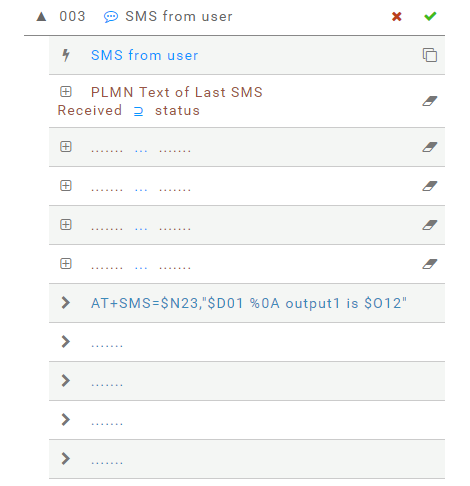
When an enabled user sends and SMS with text status
an SMS is sent back with text $D01 %0A output1 is $O12 where:
$D01 is the device name
%0A is an escaped character to add a new line within the SMS
$O12 is the current status of output 1
- An incoming SMS from an enabled user triggers the rule
- Verify the last SMS includes the text
status
It means Last SMS received is a SUPERSET of status - The first action is to send an SMS
RULE 4
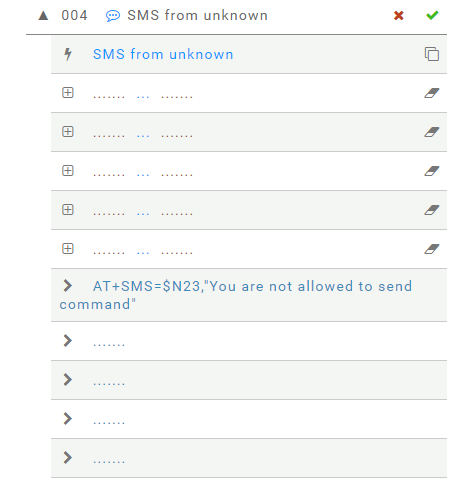
A warning SMS is sent back in reply to SMS received from unknown where
$N23 is the phone number of the last SMS sender
- An incoming SMS from unknown triggers the rule
- We do not set any conditions
- The first action is to send an SMS
TAGS
As you may see in the examples above, the value of a parameter included within the DEVICE MAP can be included within messages specifying its TAG with a leading $.
AT COMMANDS
The rules described above can also be set with the following AT commands
AT#ER=001_SME_$N24)S1_____out1=ON____
AT#ER=002_SME_$N24)R1_____out1=OFF____
AT#ER=003_SME_$N24)status_____AT+SMS=$N23,"$D01 %0A output1 is $O12"____
AT#ER=004_SMU______AT+SMS=$N23,"You are not allowed to send command"____